 SubHover
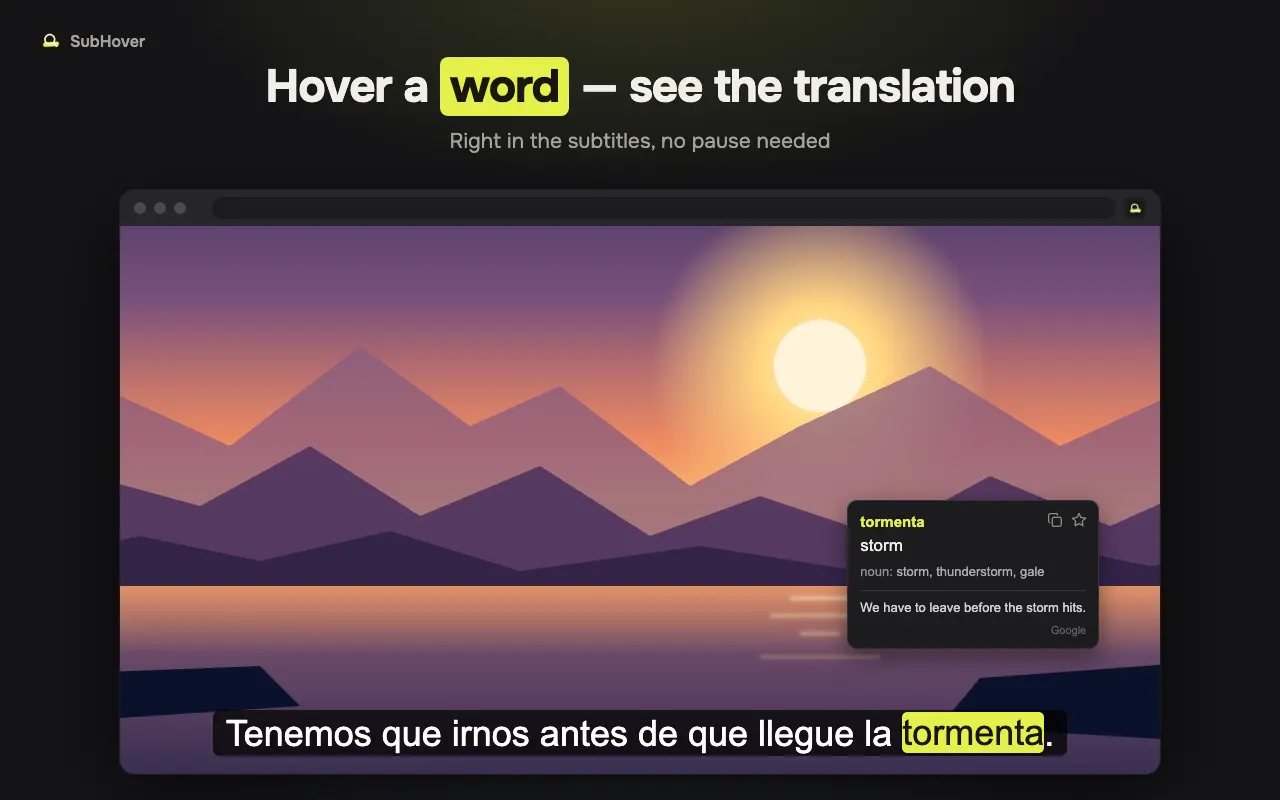
Hover a word in video subtitles — see the translation
SubHover is a free browser extension for learning languages while you watch. It turns the subtitles of a video into a live dictionary: hover a word, and its translation appears right above it, no pause needed.
Free. No account, no ads.
What SubHover does
- Hover a word — see its translation instantly while the video keeps playing.
- Drag across several words — translate a whole phrase or idiom.
- Word groups — phrases like “a few” or “break out” light up together and are translated by meaning.
- Burned-in subtitles — text inside the picture can be hovered and translated too.
- Song lyrics — in music videos and music services the line moves in time with the music.
- No subtitles? Turn on subtitles from the audio and hover them the same way.
- Personal dictionary — star a word, and it is saved with the sentence from the video.
- Review — saved words come back as flashcards; the ones you forget come back sooner.
- Export — the dictionary as a table for Excel or Anki.
- Record an episode — all its words in one list: by frequency or by topic.
How it works
- Install SubHover from the store of your browser.
- Open a video with subtitles — on YouTube, an online cinema or any site with a video player.
- Hover a word in the subtitles. Star it to keep it, then review it later.
Questions
Is SubHover free?
Yes. Translation through Google works out of the box for free. DeepL and AI translators (ChatGPT, Claude, Gemini and others) work with your own key.
Which sites does it work on?
YouTube, online cinemas, music services and most sites with a video player and subtitles. Subtitles burned into the picture can be translated too.
Which browsers are supported?
Google Chrome, Mozilla Firefox and Microsoft Edge on a computer.
Which languages?
You can learn any language the chosen translator supports. Reading subtitles burned into the picture works for English, German and Spanish out of the box, other languages download on first use. The extension itself speaks English, Russian, German and Ukrainian.
Do I need an account?
No. Your dictionary and settings stay in your browser. An encrypted backup keeps your words if you reinstall; it can be turned off.
Does it track me?
No. SubHover does not read your browsing history and has no ads. Anonymous usage statistics are sent only if you turn them on. Details are in the privacy policy.